

There’s never a dull moment here at Lative, and we’re all ears when it comes to making your experience better. Whether you’re part of the RevOps dream team, a sharp sales leader, or someone dissecting financial plans down to the last cent, we’ve got some updates you can’t afford to miss.
What’s new?
This release focuses on three areas: a refreshed UI that aligns the platform with the Lative brand, greater precision in capacity planning with editable cells and percentage controls, and improved visibility into territory and team performance through a visual Gantt chart and an expanded ranking table.
New and improved UI
The updated user interface (UI) offers a refreshed experience that aligns closely with the Lative brand identity. This not only enhances the visual appeal but also improves user experience by making the platform more intuitive and engaging.
Fine-tuning the headcount KPI
We’ve retooled the Headcount KPI to showcase the total number of people on board as of the end date of your selected period. So, if you’re analysing ‘year-to-date,’ what you’ll see is the number of rockstars you’ve got as of today. No fuss, no ambiguity. The revised KPI cuts through the noise and hands you a precise snapshot of your team’s size at the end of any selected period.
Capacity planning: edit cell and percentage enhancements
The capacity planning module now includes enhanced functionalities for editing cells and adjusting percentages. This allows revenue and sales operations teams to fine-tune their capacity planning with greater precision. The feature simplifies adjusting forecasts and plans with real-time data, enabling teams to respond quickly to changing market conditions.
Territory adjustments: visual Gantt chart, FTE assignment
This update introduces a visual Gantt chart for Full-Time Equivalent (FTE) assignment in headcount planning. This visual tool enables sales and finance leaders to efficiently allocate resources to their territories and adjust headcount in a timeline view. It’s particularly useful for understanding how changes in resource investment impact sales capacity over time.
Ranking table: efficiency and performance dashboards
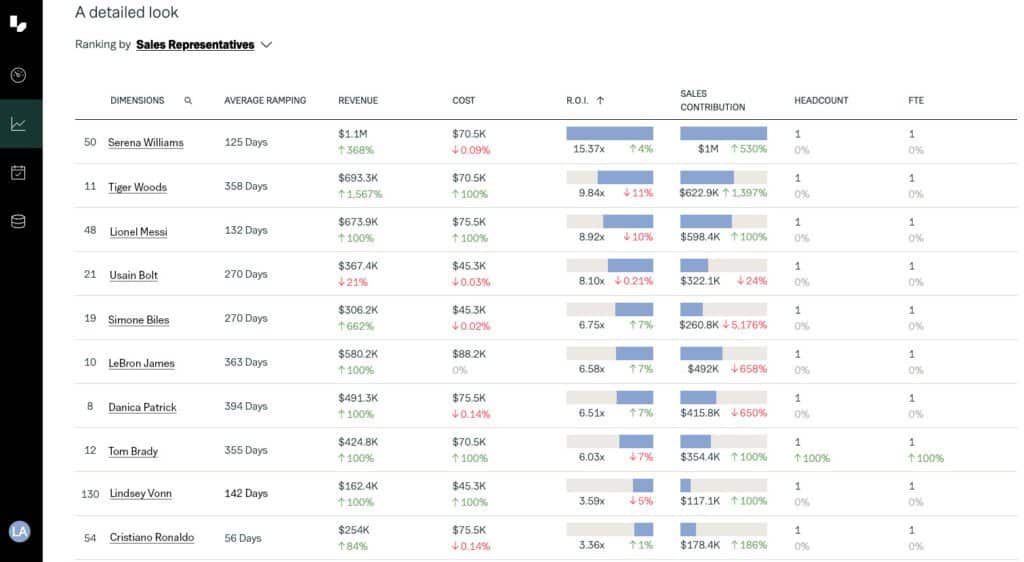
The new ranking table feature in the efficiency and performance dashboards now includes key metrics such as Average deal size by territory and Sales Representative, Return on Investment (ROI), and Sales Contribution. These additions provide sales and finance teams with deeper insights into individual, team, and territory performance, helping them identify top performers and areas for improvement.
More updates worth your attention
Alongside the major features, we’ve shipped several smaller improvements that affect daily use: clickable rep profile cards, a redesigned sidebar, individual productivity broken out by tab with gap planning, editable attrition assumptions in capacity simulations, and shared saved views so your whole team is working from the same data.
Show profile card: link to view sales representative details
With the new profile card feature, users can easily access detailed information about individual sales representatives. This clickable link within the platform brings up a comprehensive view of a salesperson’s performance, aiding in better understanding and managing sales team dynamics.
Sidebar new design
The redesigned sidebar enhances the platform’s navigation, making it more user-friendly and efficient. The new design focuses on simplicity and quick access to frequently used features, ensuring that users can find what they need without unnecessary clicks or searches.
Individual productivity and actions on different tabs
This feature provides a more granular view of individual productivity by separating actions into distinct tabs. It also includes a clear gap plan that helps sales and operations teams identify and address disparities between targets and actual performance. This is particularly valuable for tailoring coaching and development plans for each salesperson.
Editable attrition assumptions in capacity planning simulations
Alright, let’s get into the weeds (but not too deep). Now you can punch in an attrition assumption when running a capacity planning simulation. See in real-time how attrition could influence your team’s capacity. It’s like having a crystal ball, but grounded in data.
See and edit all saved views
We’re breaking down silos! Previously, you could only view your own saved views. We’ve levelled up this feature, allowing you to see other team members’ views for better collaboration, so everyone is looking at the same numbers.
Minor bug updates and smoother sailing
We get it, no one has time for bugs, especially when you’re in the fast-paced world of sales, finance, or operations. That’s why we’ve also rolled out a bunch of under-the-hood improvements to fix those pesky bugs and enhance the platform’s overall performance.
These updates are part of our ongoing commitment to making Lative the go-to platform for modern sales and revenue teams. We believe these new features and improvements will make your strategic planning more straightforward, accurate, and yes, even a little more enjoyable. As always, we’re keen to hear your thoughts. Your insights help us create a product that doesn’t just meet expectations—it exceeds them.
So that’s the roundup. Feel free to dig in, explore the updates, and let us know how they’re making a difference in your day-to-day. We’re all ears and always looking to fine-tune our platform to better serve you.
To learn more, request a demo, contact us or install a free 30-day trial from the Salesforce AppExchange today. We’d love to hear from you!